
Architectural Smart Nodes: Designing Sophisticated Workflows with Ease
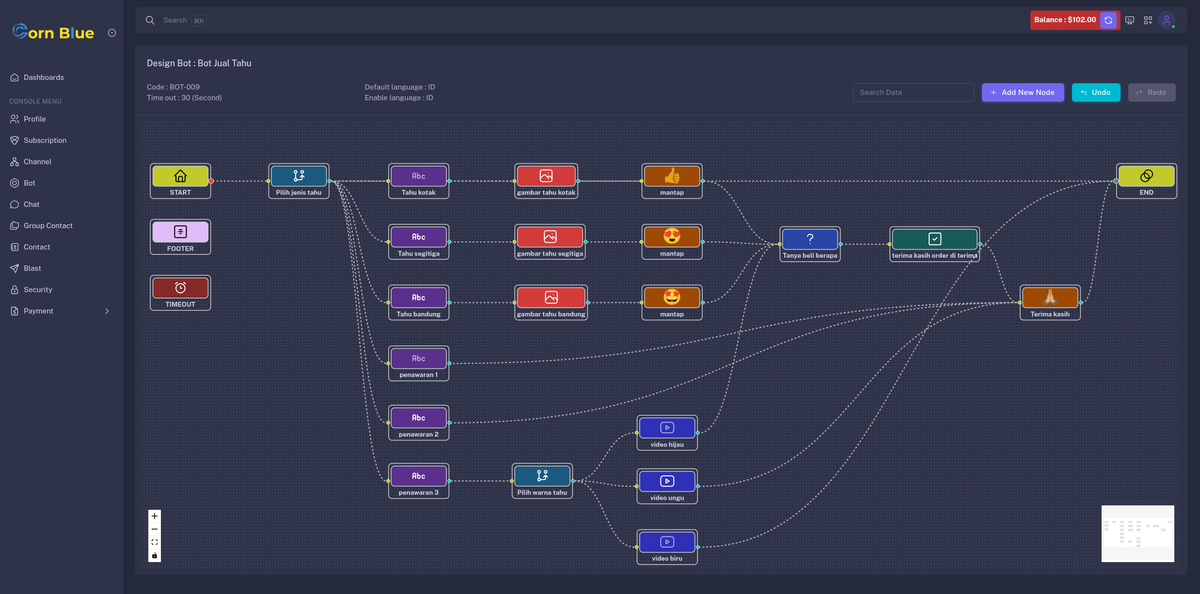
In the world of automation, the difference between a "basic bot" and a "smart assistant" lies in its architecture. Cornblue introduces a high-performance visual interface that allows you to design complex, human-like conversations using a diverse library of Smart Nodes.
Whether you are sending a simple greeting or a complex video product demo, our architectural nodes ensure your data flows exactly where it needs to go.
The Cornblue Node Library: Your Building Blocks
Our visual interface allows you to drag, drop, and link various components, each with its own specific logic:
- Wording: The core of your bot. Send text content with support for custom variables (like the customer's name) for a personalized touch.
- Media Nodes (Image, Audio, Video, Document, Sticker): Engage your audience with rich media. Upload files directly to show products, explain services, or send branded stickers.
- Reaction: Provide instant feedback with automated emoji reactions (👍, ❤️, etc.) to humanize the interaction.
- Branching: The "Menu" node. Create multiple paths based on user choices—perfect for list menus and service options.
- Question & Answer Wrong: The duo that ensures high-quality data. The Question node stops the flow to wait for an answer, while the Answer Wrong node handles invalid inputs gracefully.
- Escalation: The "Human Bridge." Instantly notify a human agent to take over when the bot has done its job.
Understanding the Flow Logic: Sequence & Triggers
Cornblue operates on a Seamless Sequence logic. The bot will automatically execute nodes one after another—for example:
Greeting (Wording) ➔ Brand Logo (Image) ➔ Intro Audio ➔ Product Video
When does the bot stop? The sequence pauses only when it encounters a "Stop Node":
- Branching Node: Stops to wait for the user to pick an option from a menu.
- Question Node: Stops to wait for a valid text input (e.g., an email or phone number).
- Escalation Node: Stops the bot entirely to let a human agent reply chat.
Smart Escalation & Office Hours
Our Escalation Node is context-aware. If a customer asks for an agent:
- Inside Work Hours: The bot stops, and your agent is notified to take over.
- Outside Work Hours: The bot automatically informs the customer that agents are away, but keeps the bot active so the customer can still browse or reset the chat.
Behavior, Status, and Connectivity
Building a bot on Cornblue is more than just drawing lines; it’s about managing the "soul" of the interaction:
- Timeout Auto-Close: Define an idle limit (e.g., 5 minutes). If the customer goes silent, the bot politely closes the session to keep your inbox clean.
- Global Language Settings: Support over 100 languages. Choose a Default Language and let customers switch on the fly.
- Multi-Channel Reach: Connect your single bot design to currently Webchat and WhatsApp simultaneously.
- Note: While one bot can handle many channels, one channel can only be managed by one active bot to prevent logic conflicts.
Pro Tips for New Architects
- Instant Base: You don't start from a blank page. Every time you click the Orange Design Button, Cornblue generates a Base Flow (Greeting, Timeout, Language, and Closing) for you automatically.
- Language Sync: If you enable multiple languages, remember to click each node and provide the translation. Your bot will handle the rest!
- Active Status: Use the Status Toggle to take your bot offline instantly for maintenance without deleting your hard work.
Ready to turn your business logic into a visual masterpiece? Start building with Architectural Smart Nodes in the Corn Blue Flow Builder today!